Instant Access
Your Oshi Casino account connects you to the full game library, sportsbook, cashier and VIP programme in one sign-in.
Everything About the Login at Oshi Casino
Access your account, your active bonuses and 8,000+ games in seconds from any device.
Keep Your Account Secure
What You Should Do
What You Should Avoid
Your Account, Your Way
Instant Access
Your Oshi Casino account connects you to the full game library, sportsbook, cashier and VIP programme in one sign-in.
Secured Login
Every login session is protected by 256-bit SSL encryption. Two-factor authentication is available for an extra layer of account security.
Works on Any Device
Sign in from a desktop browser, an Android phone or an iPhone. The mobile-optimised interface adjusts automatically, no app required.
A failed login at Oshi Casino almost always comes down to one of four things: an incorrect email address, a wrong password, a browser issue or a temporary lock after repeated failed attempts.
If your credentials are correct but the login still fails, clear your browser’s cookies and cache, then try again. If you are using a saved password, confirm it matches the one you set during registration, as browser-stored passwords can become out of date after a password change. Players who have not logged in for an extended period may find their session token has expired, in which case simply entering fresh credentials resolves the issue.
If your account is locked after multiple failed attempts, reach out to the support team at [email protected] or via the 24/7 live chat. The compliance team may request identity verification before restoring access, which is a standard security measure across all Dama N.V. platforms. Australian players can submit an Australian driver’s licence, passport or Medicare card to satisfy this step.
Protecting your Oshi Casino account begins with a strong, unique password. Because the account holds real-money balances and links to payment methods, treat it with the same care as your online banking credentials. Two-factor authentication (2FA) is available in the account security settings and adds a second verification step at login, using an authenticator app on your phone. This makes it significantly harder for anyone other than you to access the account even if the password is compromised.
Oshi Casino uses 256-bit SSL encryption on every connection, so your credentials are protected in transit. The platform will never ask for your password via email or live chat. If you receive a message requesting your password from any source claiming to be Oshi, do not respond and report it to [email protected] immediately.
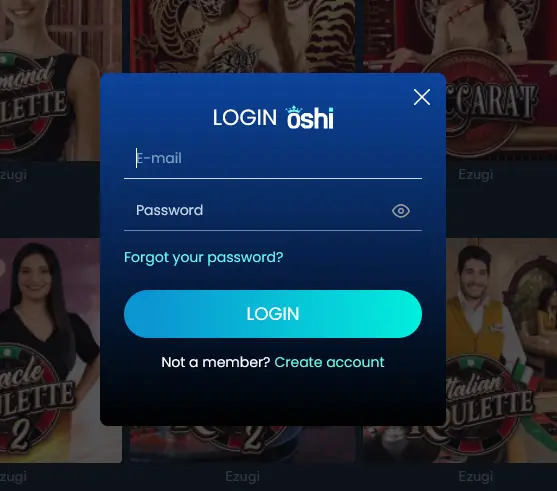
Oshi Casino uses a standard email-and-password login. Enter the email address you registered with, followed by your account password, on the sign-in screen at oshislots.com. The session is maintained securely via an encrypted token, so you will remain logged in on a trusted personal device until you actively sign out or the session expires.
Players who have linked a crypto wallet as their primary payment method should note that wallet authentication does not replace the standard email-and-password login; the two operate independently.
Open oshislots.com in your preferred desktop browser, click the “Login” button in the left-hand menu and enter your registered email address and password. If you have 2FA enabled, complete the verification prompt from your authenticator app. Once confirmed, you land directly in the game lobby.
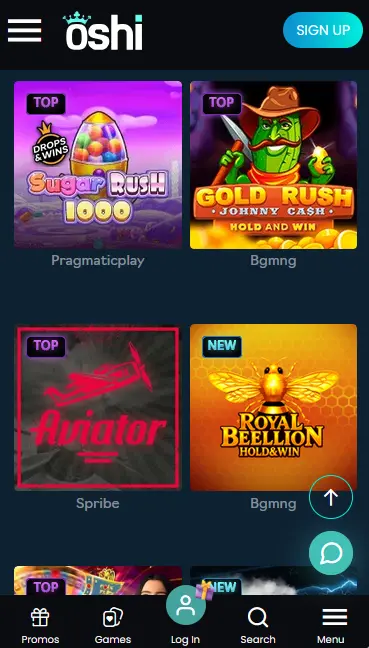
Navigate to oshislots.com in the native browser on your iPhone or Android phone. The site detects the screen size and loads the mobile-optimised layout automatically. Tap “Log In” in the bottom menu, enter your email and password, complete any 2FA step if enabled, and you are taken to the full mobile lobby.
Oshi Casino does not offer a dedicated native app on the App Store or Google Play. Mobile play is delivered through the responsive web experience described above. If you have added the Oshi Casino shortcut to your home screen via your browser’s “Add to Home Screen” option, tapping that icon opens the site and you can sign in exactly as you would in a browser. See the full app and compatibility guide for instructions on setting up a home-screen shortcut on both Android and iOS.
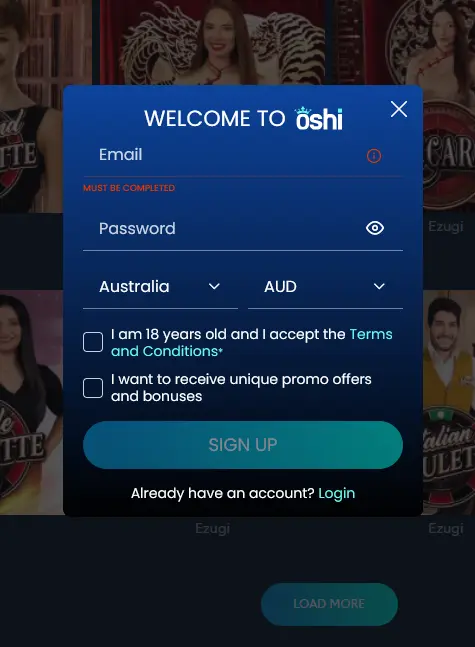
Creating an Oshi Casino account takes only a few minutes. Navigate to oshislots.com, click “Sign Up,” provide your email address, set a secure password, choose Australia and AUD, and tick the box confirming you are 18 and accept the Terms and Conditions. You must be 18 or older to register. Once your account is verified, you can make your first deposit and claim the welcome package of up to $6,000 plus 450 free spins. KYC verification, including submission of an Australian driver’s licence, passport or Medicare card alongside proof of address, will be requested before your first withdrawal is processed.
Login Questions Answered
Click 'Forgot Password' on the login screen, enter the email address registered to your account and follow the reset link sent to that address. Check your spam folder if the email does not arrive within a few minutes.
Yes. Oshi Casino uses a fully responsive web design, so you can sign in through the mobile browser on any Android or iOS device without downloading anything from the App Store or Google Play.
For security, repeated incorrect password entries trigger a temporary account lock. Contact the support team via live chat or email [email protected] to unlock your account and verify your identity.
Sign In and Start Playing
Claim up to $6,000 and 450 free spins across your first deposits.
Join and Play Play responsibly: 18+ only, gambling can lead to addiction, and bonus terms apply.